this post will be updated as I find more websites to add! please check with the original before reblogging to see if there’s an updated version, and message me with more suggestions if you have them!!
websites in pink allow NSFW posts!
for general use
joinmastodon.org – basically like if twitter and discord had a child??
mewe.com – privacy-focused, has groups and private messages
myspace.com – yes, it still exists, i’m just as surprised as you
swarmr.com – looks like a clone of tumblr, though i haven’t tested
twitter.com – allows posting both text and photos in sets, allows retweets
livejournal.com – still an option, but questionably safe for fandom
mibba.com – for creative writers, centered around community feedback
wordpress.com – old and well-established, often considered the default
geared towards artists and photographers
deviantart.com – huge community, allows posting art + sorting into folders
flickr.com – great community for photographers, can join groups
furaffinity.net – similar to DA but for furries, easy to display commish info
instagram.com – photo and video posts, excellent tag search
newgrounds.com – an oldie but a goodie, allows a ton of media types
piczel.tv – allows both streaming and posting art / photosets to a gallery
pixiv.net – huge anime art community, allows livestreaming
chat or forum based
aminoapps.com – community-based, has blogs + chat, custom themes
discordapp.com – great chat app, text + voice, can join infinite servers
reddit.com – literally a community for everything, SO MANY CAT PHOTOS
18+ only
bdsmlr.com – microblogging + social media for people into kink
blogr.xxx – a tumblr clone created specifically for sharing porn
paid platforms
patreon.com – subscription-based access to many diff types of content
pillowfort.io – still in beta, but should function almost identically to tumblr
typepad.com – similar to wordpress but with reblogging and a dash
defunct platforms
(so people will stop telling me i forgot them)
jux.com – shut down in 2014 due to lack of funds
shoandtell.me – now redirects to someone’s personal blog
soup.io – more or less closed down this year due to GDPR issues
ways to save your current tumblr posts
use the wayback machine! you do have to archive each page of your blog individually but once you do all the content, including media, will be saved exactly as it was at the moment you archived it.
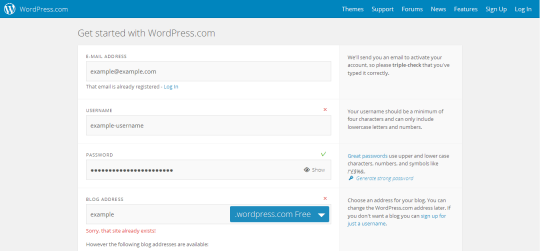
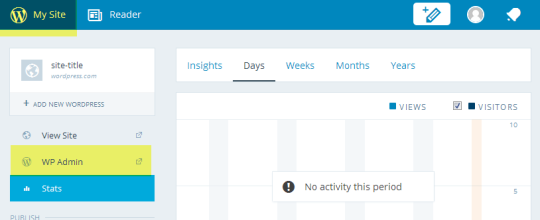
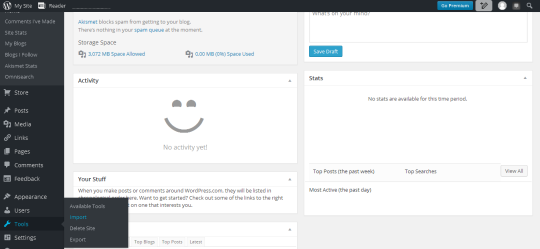
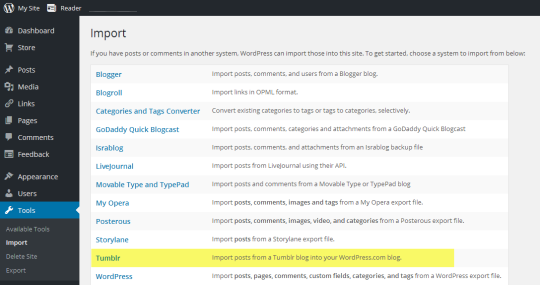
wordpress allows you to directly import whole tumblr blogs, and if i recall correctly it’s something both dreamwidth and pillowfort have said they are working on.
if you have some knowledge of computers you can try this github solution which uses a python script to download your whole blog to your computer. even if you don’t know anything about programming or the command line they give a very good beginners tutorial on how to use it so you should still give it a shot!
if that’s still a little daunting you can try soarcodes’ tumblr post that also has a decent tutorial!
some notes
please note that every site on this list will have pros and cons, and i haven’t listed them here since this post would be a mile long otherwise. please do your research before moving completely over to another site in case they have policies you disagree with.
also, because I see a lot of misinformed people ranting about this: deviantart does not own the art you post. some years ago hot topic stole a ton of art from DA and sold it on merchandise and people assumed that DA gave them permission to do it despite there being literally zero evidence for that claim. DA explictly states in their TOS that you retain copyright and sole license of the art you post.
I was just semi-complaining that I was still looking for a decent way to backup my +6k posts without having to use paid services or even just wordpress (which has an import from tumblr tool that asks for permission to access your blog and also make posts), when I decided to actually put some effort into my google search.
Results were positive: I have successfully backed up my blog*
*By which I mean: everything that I have ever posted. Not included: drafts, queue, likes, followers, following, comments, notes, chat.
I followed this method (word by word), and now have a 450 MB folder on my computer with the name of my blog on it containing:
1. Folder “Archive” (contains .html files listed by month) 2. Folder “Media” (contains gifs and images, mine has +1k files in it; might contain also audios but I have no way of confirming that because I’ve never reblogged an audio post from this blog) 3. Folder “Posts” (contains single .html files, each one a post; I have +4k files in it) 4. Folder “Theme” (contains only my avatar, but it might be a matter of if you have personalized themes or not) 5. .html file “Index” (by opening it it will give you the archive of your blog organized by month; clicking on a month will open up the archive for that month, and you’ll be able to read all the posts for that month as if you were on your blog**, except sans your theme graphic, with each page containing 50 posts)
**I can see gifs, links, embedded videos, tags, number of notes (but I can’t open up the notes, clearly), text is also correctly formatted.
So yeah, in case anyone wants a very quick way to back up their blog, it took me less than 10 minutes.
P.S. I didn’t have any issue, but to be on the safe side always check for spyware and virus threats before and after downloading anything.
this is actually really useful if you have an art blog full of years of work that you otherwise no longer have access to the original files. A lot of the art I have in the early days of my art blog are in that boat. I did this process JUST for that reason and I was pretty astonished at just how many pieces of media it backs up! (literally all of it) Drawings I didn’t even realize were sitting in my archive due to having been posted to text posts or undercuts, or untagged for years! It’s worth it if just for that, even if tumblr isn’t shutting down or deleting your blog.
If you’ve logged in to Tumblr in the last few days, you will have seen the GDPR warning, telling you Tumblr is part of the Oath family of sites, and requiring you to opt-in to their privacy settings.
You may not have realised that, in contravention of the GDPR rules which ban default opt-ins, if you don’t go into the ‘more options’ button and opt out of each individual sharing partner, Tumblr will share your data with a whole huge list of other companies. Like, 300 of them.
If you’ve already opted in to the Oath privacy stuff, you need to go to your Settings page:
Click the Privacy button on the right:
Then, click the little button next to ‘Cookie Consent’ to revoke it.
After confirming you want to revoke consent, you will immediately be taken to that big privacy opt-in page again. From that point we follow the steps @the-mad-duchess described – first click ‘Manage Options’:
Then, click the blue ‘Manage’ button, and expand the two lists. You’ll see five kinds of data sharing, and like 300 different companies:
The first five you can click manually more easily than using javascript. That might be enough to opt out of any data sharing – but I want to be sure. So, let’s make sure we disable every single enabled partner as well.
However, clicking on 300 little buttons to opt out of is an absurd demand. There is, thankfully, a shortcut, using your browser’s developer tools.
What you want to do is open the web console. In Firefox, you do it like this: click the little menu in top right, then go down to where it says Web Developer:
Then, click the Web Console option:
This will open up the web console in the bottom of the screen. It will have a bunch of messages in it that you can ignore:
As shown, what we want to do is copy and paste some JavaScript code into this, then hit ‘enter’, which will make the browser simulate a mouseclick on every single one of these little buttons and thereby turn them all off. The code is this:
var rows = document.getElementsByClassName("vendor-options")[0].children;
for (var i = 0; i < rows.length; i++) {rows[i].lastChild.firstChild.click();}
If you’re not familiar with JavaScript, let me briefly explain what this is doing. The first line finds the part of the page with all the buttons in it – specifically, the rows in the table of vendors, which is identified by the “vendor-options”. The second line goes through each of them one by one, and for each row of the table, goes inside and finds the button, and simulates a click on it.
If it works correctly, you will abruptly scroll to the bottom of the page and all those little buttons will slide to the ‘greyed out’ position. Now you can go ahead and click Done, click the OK button, and carry on using Tumblr, trusting that if they keep their word, they won’t share your data with those 300 companies.
I’m gonna chat with the New XKit devs to see if this can be added (they may already be working on it). But I hope this saves you some time.
Note also – this is not actually compliant with the new GDPR laws. The rule is that you have to explicitly opt in to letting companies use your data, you can’t have a list of default opt-ins behind a button like this. At some point, somebody will hopefully sue Yahoo/Oath and establish that in court. In the meantime, let’s keep our data to ourselves.
reblogging to share the resource but I do want to point out that the code amounts to “pinterest no pinning”. like dora the explorer’s swiper the fox… but if swiper were a middle-aged stay-at-home-mom with a smartphone. technology is truly amazing
Ey! Those who have to deal with those art thieves on Pinterest can use this code from Pinterest themselves!
So if a porn bot reblogs and puts a link to your selfies you can do this
SO IF A PORN BOT PUTS A LINK TO A PORN SITE/VIRUS YOU CAN FOLLOW THESE STEPS TO HAVE IT REMOVED. ALSO IF ANY REMOVES THE ORIGINAL CAPTION OF YOUR POST TO BOOST THEIR BLOG YOU CAN REPORT THEM (AND GET THEM REMOVED) TOO.
YOU CAN ALSO FILE A DMCA (Digital Millennium Copyright Act) AGAINST THEM TOO. http://tumblr.com/dmca
As of today (2017/01/21) I’ve noticed that Tumblr descriptions that have HTML integrated in them no longer show up properly. Tumblr now completely ignores and deletes any custom HTML and only shows plain text. One way to fix this problem:
Go to your Tumblr main page, right-click and view page source. Do this BEFORE you click “Edit Theme”
Search for your description text in the source page by typing the exact words of your description
Copy your description text. It should be in between
and
. Note that the word “desc” can be anything, it’s just the element name that holds your text
Go into “Edit HTML” of your Edit Theme page, and replace {Description} with your description text you just copied
All the HTML of your description should now be intact. Note that you will have to repeat this process if you change your theme.



 refessence