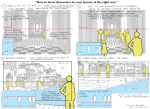
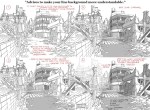
Lighting is often underestimated in illustration – a lot of illustrators and beginning artists look at it as a decorative element, or as purely a tool used to showcase the form. A lot of beginning artists are afraid of shading and of using harsh lights. But even with the lighting mastered, even with perfect rendering and good understanding of form in space an integral element of the light remains missing in their pieces.
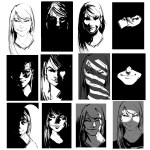
Look at the samples above: the same character’s head has been used in every thumbnail, and the only thing I have tweaked was the cropping and manner of light used on the features. Every single one of these frames tells a different story and gives off a different vibe simply by using light to focus on the features I want you to focus on.
Read how lighting can be used to enhance character, mood, and interaction within your pictures below the cut.
i use overlay all the time to make colours more vibrant and to make areas warmer or cooler. good for colourful ambient light (like glowy magic stuff).
multiply is really good for establishing a light source very quickly!! play around with the hue to get shadows with cool colours. for more detailed work you can use two or three tones on a multiply layer for more dimension.
screen is something i only recently started using regularly! it’s really great if you have a very bright light source. you can also use screen and paint on the edges of a backlit character to make the lighting more intense. a good thing to know about screen layers is that the darker the colour you use, the less it lightens; using black on a screen layer leaves no effect on the colours underneath (the opposite is true for multiply layers!).
and you can also use these layers for an entire painting instead of just on a character! i don’t have a visual example on hand, but stuff like making the area around a warm light source warmer, making a light source brighter and more vibrant, or using gradients set on multiply or screen are just some of the ways you can apply these to a full painting 🙂












 refessence