Well… thats about it! Of course there’s a whole bunch of useful resources which I just couldn’t include in this post because it was getting too long.
Even if you yourself aren’t trans and wouldn’t find this content useful, please reblog because it may be of great help to some of your followers.
And if you ever have any trans-related questions or need some advice or support, feel free to message me at my main blog here or at my personal/transition blog here.
aaaaa i haven’t seen a post like this before so i figured i’d make my own? i hope a few people would find this useful cuz i don’t think everyone knows yet! anyway here we go:
Anything between 300-539 pixels width will be stretched to 540!
So 299 is the magic number to avoid tumblr blowing up your reaction images! What I also do is just set my canvas to 540 pixels and draw within that, if I think 299 pixels will be too small.
Of course, this only applies to the website and not the mobile app.
You’re a life savior.
if tumblr makes an image stretch, there’s a way to revert it back to it’s intended size!!
click the gear symbol at the top right of a text post and go down to html
in the image file, it’ll say “tmblr-full”. you can change that to “tmblr-hires” and your pic won’t be blown up!!
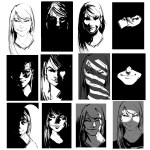
Lighting is often underestimated in illustration – a lot of illustrators and beginning artists look at it as a decorative element, or as purely a tool used to showcase the form. A lot of beginning artists are afraid of shading and of using harsh lights. But even with the lighting mastered, even with perfect rendering and good understanding of form in space an integral element of the light remains missing in their pieces.
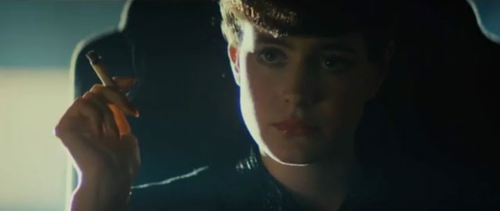
Look at the samples above: the same character’s head has been used in every thumbnail, and the only thing I have tweaked was the cropping and manner of light used on the features. Every single one of these frames tells a different story and gives off a different vibe simply by using light to focus on the features I want you to focus on.
Read how lighting can be used to enhance character, mood, and interaction within your pictures below the cut.
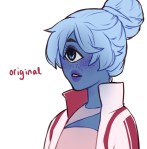
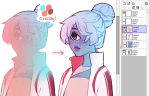
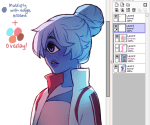
i use overlay all the time to make colours more vibrant and to make areas warmer or cooler. good for colourful ambient light (like glowy magic stuff).
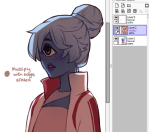
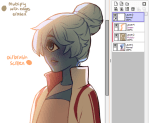
multiply is really good for establishing a light source very quickly!! play around with the hue to get shadows with cool colours. for more detailed work you can use two or three tones on a multiply layer for more dimension.
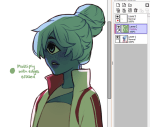
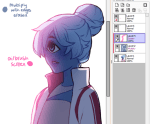
screen is something i only recently started using regularly! it’s really great if you have a very bright light source. you can also use screen and paint on the edges of a backlit character to make the lighting more intense. a good thing to know about screen layers is that the darker the colour you use, the less it lightens; using black on a screen layer leaves no effect on the colours underneath (the opposite is true for multiply layers!).
and you can also use these layers for an entire painting instead of just on a character! i don’t have a visual example on hand, but stuff like making the area around a warm light source warmer, making a light source brighter and more vibrant, or using gradients set on multiply or screen are just some of the ways you can apply these to a full painting 🙂
Given the spate of recent terrible updates, it might be time to bring this to your attention.
Tanburu is a replacement for Tumblr, written by myself. Its intention is to be clean, user friendly, and simple to use with minimal fuss and pain. To that end, many of the niggling problems Tumblr has are fixed, including but not limited to:
– Sideblogs act as if they were independent blogs – they can reply to posts, send their own messages, and have their own follow lists. There’s no need to have more than one account now.
– Reblog snipping works without any issues. Additionally, on reblogs, the source of a post cannot be edited, and it’ll always show in the corner, under the tags. This will link directly to the original post
– The mobile version’s functionality isn’t limited in any way. (Note: I don’t have an app, but I’ve optimised it so your phones browser will display it just fine.)
– “Do not reblog” is enforced:
– The post editor has a lot more options for text formatting.
–
Images are kept at the size they’re uploaded. If it’s too big to fit
the post, it shrinks down – though you can always click the image to get
the full size one. Images smaller than the window are never stretched
to fit, good for sprites.
– Also, more than one image per line. The fuck was the point of disabling that.
– You can embed soundcloud and YouTube posts easily, using whichever size you prefer.
– A blocking system is in the works now, and tag blocking will be supported natively.
Be warned, a lot of features are missing right now. The site is under heavy development – the inbox feature isn’t in, and we’re still working on the post engine (hence the header warning). But you’re quite welcome to register and help us test! We have an IRC channel here if you’d like to ask any questions, report bugs, or suggest features! It’s highly recommended to join while we’re still in beta.
Timezone reblog I guess. Since this was posted I got messages working.






 refessence