It took me until I was 20 to get my driver’s license, even though I got my car when I was 17. I have a pretty severe driving phobia, which is worsened by my bad eyesight and my anxiety disorder. I have been consistently driving for over a month now, and it has gotten a little bit better. Here are a few things that have helped me:
Give yourself the time you need. Do not feel like you need to speed through a turn or turn right on red, even if some impatient driver behind you is honking or on your bumper. You are legally allowed and obligated to slow down when you need to. And there is nothing wrong with waiting for a red light to turn right.
Listen to music before you drive that calms you down. For me, this is rock music, but whatever makes you feel better. A few songs before you start driving will make you feel better.
Declutter your car. Trash and clutter make most people feel more anxious. If your car is clean, you will likely feel more in control and confident. There will be no distracting rustles or rolling. Also try getting a nice, soothing, good-smelling air freshener. The ones that clip onto your heating vents are nice.
If you worry a lot about locking your keys in your car or leaving your lights on (like I do), put masking tape on your door handle and write KEYS or LIGHTS on it. You will see it when you reach for the handle and it will likely remind you.
Don’t let people bully you about not liking to drive. If you have someone with you who wants you to drive somewhere or some way that you are not comfortable with, don’t accept that. Tell them to stop, explain your phobia, or if all else fails, pull over and kick them to the curb.
i’m 21 and only just got my license literally this past saturday, 4 days ago, bc i have been absolutely terrified of driving since i realized i was legally allowed to do it, and i’m still working on adjusting. my own tips:
don’t feel bad about waiting to make a turn when there’s a car coming, even if it’s far enough away that you probably could have made it
if you’re going the speed limit and people are coming up on your bumper in the right lane, don’t freak out or get anxious. don’t worry that they’re getting annoyed, it’s not your problem
if you’re still nervous about driving under certain conditions (at night, etc.) even after you get your license, don’t feel bad about asking someone who’s an experienced driver to come along with you until you’re confident and practiced enough to do it on your own–and also don’t be afraid to ask them questions
consult your driver’s manual? it might sound kind of dumb but even after you get your license, if you realize you’re not sure what the best action is in a particular situation, do what’s safest/makes the most sense in the moment, and then later look it up in your manual so you’ll know for sure next time
i’m 26 and i still hate driving and it limits me a lot because i can’t get around as easily – i avoid doing things that involve driving or make plans around having other people drive me even though i have a car – i’ve never seen a post like this
thank you 🙂
More!
• If you need to merge and have your turn signal on but no one is letting you over, don’t worry! Missing my exit/turn always made me panic, but I got used to going around. Take the next exit/turn and double back if necessary.
• If you’re in a situation where you need to drive across two or more lanes of oncoming traffic, remember that you don’t have to cross them all at once! I get uncomfortable trying to time the gaps, so if (for example) I need to make a left, I’ll turn right, get in a turn lane, and double back so I can go in the direction I need to.
• If there’s a traffic jam on the highway, try not to completely stop! Slow down as much as possible, leave at least a car length between yours and the car in front of you, and let your car idle forward. It might not do much for you, personally, but the more people do this the faster a jam can clear.
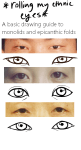
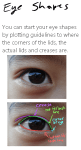
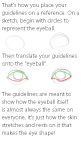
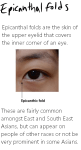
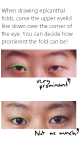
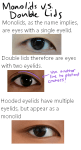
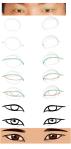
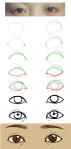
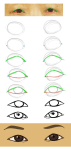
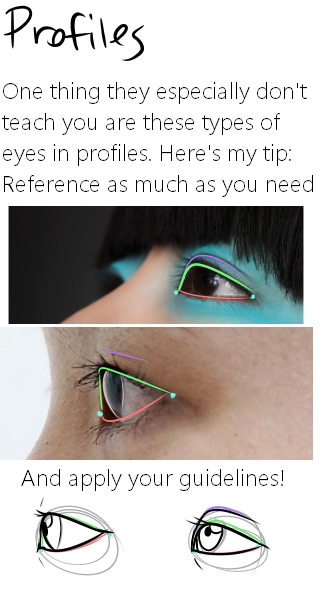
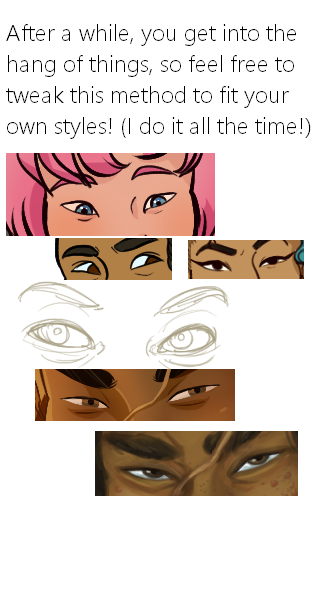
Here it is, my long winded tutorial, complete with some step by step action. I see a lot of people talk about wanting to diversify their artwork but not knowing how. This is my help to you. You really should take the time to invest in learning diverse eye shapes as diverse artwork always makes you a better artist. And frankly I’m really tired of drawing tutorials that talk up character diversity but only have the stereotypical “one Asian eye”.
I did some step by steps for those three diagrams, but I actually got them from this blog which has 14 of those examples! (Bonus: it’s a makeup blog so if you need help with that or want some idea of how to shade these eyes, there ya go)
I’ve had this list sitting around for a while (in case I ever want to try something new) and I thought I’d share it, because why the hell not, everybody loves free stuff. I’ve only used a couple, so for all I know these could be complete shit. BUT YOU NEVER KNOW, RIGHT?
*= available for both windows and mac os
GIMP * – Does a lot of the same stuff as Photoshop.
FireAlpaca * – Similar to Paint Tool Sai, so it’s a good alternative for Mac users.







 refessence