Here’s a masterpost of resources to aid in learning South Asian languages! This is by NO means comprehensive. A very limited number of languages are represented here. This search was really frustrating because the more I looked, the more I realized how many dozens of South Asian languages are simply not represented or their existence acknowledged. If you have any resources/languages you’d like to me to add, please let me know!
Buy a bat (I have my old color guard rifle) or similar. Keep it in your room/near your bed.
Get a lock for your bedroom door.
If you’re moving into a new place, change the locks. Who knows who had a key to your place before you.
Keep your phone/a phone in your room.
Get a weather alert system set up. App, weather call, little weather radio that tells you about major weather events.
Adopt a pet
Wave at your neighbors. Take note of the ones that make you uneasy. Watch out for kids always.
Be nice to your mail person. No matter what.
If you choose to drink/etc alone, unplug your wifi router. You’ll thank me.
Have extra seating. People sit when they visit. Your one comfy chair is great for you. Not so great for you + grandma + ur five cousins, your aunt, and a couple others.
Learn the self-Heimlich
When you take a shower, bring your phone to the bathroom in case you fall your phone is no longer halfway across the house, it’s just on your counter
Uhhhhhhhhhhhhhhhhh
Idk what else
If you live in an one-room apartment, put a screen around your bed. It’ll feel less like you visit people, esp. strangers, into your bedroom. Also you’ll feel much safer sleeping in the enclosure.
Cook enough for a few meals each time you cook, and freeze the extra food. That way you’ll prevent things from expiring and it’s great when you don’t feel like cooking or have no time or energy for it.
Give a key to someone near you trust, or hid it somewhere few people will look, like up in a tree. Shutting yourself out isn’t nice, esp. not at night.
Put something translucent like curtains or stickers for windows where people can walk past or look in. You’ll feel less watched that way.
Put some contant money somewhere in your room. Good to have in case your bag gets lost or stolen.
Feeling lonely? Remember, online contacts are not less valuable.
I would say maybe set reminders for everything too. Taking meds/vitamins, working out, going to sleep, waking up.
Buy a small fan for white noise at night if you’re the kind (like me) that gets anxious at all the little ambient noises that ANY building can supply in the dark.
Don’t watch scary movies in the dark by yourself, with no visitors.
NETFLIX, if you can afford it. It’s also useful because you can watch movies / shows with your online buddies at the same time, miles and states and (sometimes even) countries apart.
get an app like safetrek. never walk into allies or empty streets if there is a more populated/well-lit route to your destination. keep emergency contacts in your wallet and a red cross card with your blood type on it in case anything happens. carry a list of medications you’re allergic to, if any.
walking around with a headset or headphones discourages people from yelling at you on the street, and it’s easier to escape from hasslers. however, it’s pretty advisable to not have anything actually playing so you can be aware of your surroundings. if anything, have it at low volume.
if you get grabbed on the street (this used to happen to me a lot), immediately scream, and the person will usually get startled, giving you time to get away.
if you feel like you’re in a really bad place, call someone, or even pretend like you’re calling someone. say where you are. act like you’re planning on meeting up with them. be loud about it. make it seem like someone will notice if you go missing, even for a little bit.
also u should look up manufacturer’s coupons like damn i feel like a successful suburban mom every time i walk into cvs and save 2 dollars on my toothbrushes
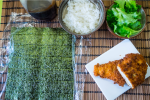
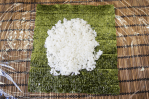
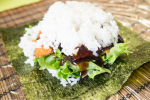
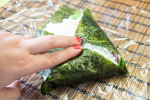
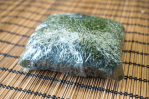
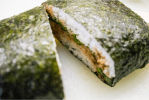
A new take on the age old rice ball is gaining popularity in Japan. Known as onigirazu, so named as chefs can quickly make them without worrying about getting sticky rice hands, these versatile and hearty dishes have rapidly become popular search subjects on cooking apps such as Cookpad and have even inspired several recipe books.
The photos above by Laura Tomàs Avellana on Flickr show how to make onigirazu in just a few steps. All that is needed is nori, rice, plastic wrap, and fillings.
ARE YOU FUCKIN SERIOUS I’VE SPENT SHIT TONS OF MONEY ON CALLIGRAPHY PENS FOR ART AND YOU’RE TELLING ME I CAN MAKE MY OWN FOR LESS THAN 4 FRIGGEN DOLLARS??? THIS IS BULLSHIT MY ENTIRE ART LIFE IS A LIE
this post will be updated as I find more websites to add! please check with the original before reblogging to see if there’s an updated version, and message me with more suggestions if you have them!!
websites in pink allow NSFW posts!
for general use
joinmastodon.org – basically like if twitter and discord had a child??
mewe.com – privacy-focused, has groups and private messages
myspace.com – yes, it still exists, i’m just as surprised as you
swarmr.com – looks like a clone of tumblr, though i haven’t tested
twitter.com – allows posting both text and photos in sets, allows retweets
livejournal.com – still an option, but questionably safe for fandom
mibba.com – for creative writers, centered around community feedback
wordpress.com – old and well-established, often considered the default
geared towards artists and photographers
deviantart.com – huge community, allows posting art + sorting into folders
flickr.com – great community for photographers, can join groups
furaffinity.net – similar to DA but for furries, easy to display commish info
instagram.com – photo and video posts, excellent tag search
newgrounds.com – an oldie but a goodie, allows a ton of media types
piczel.tv – allows both streaming and posting art / photosets to a gallery
pixiv.net – huge anime art community, allows livestreaming
chat or forum based
aminoapps.com – community-based, has blogs + chat, custom themes
discordapp.com – great chat app, text + voice, can join infinite servers
reddit.com – literally a community for everything, SO MANY CAT PHOTOS
18+ only
bdsmlr.com – microblogging + social media for people into kink
blogr.xxx – a tumblr clone created specifically for sharing porn
paid platforms
patreon.com – subscription-based access to many diff types of content
pillowfort.io – still in beta, but should function almost identically to tumblr
typepad.com – similar to wordpress but with reblogging and a dash
defunct platforms
(so people will stop telling me i forgot them)
jux.com – shut down in 2014 due to lack of funds
shoandtell.me – now redirects to someone’s personal blog
soup.io – more or less closed down this year due to GDPR issues
ways to save your current tumblr posts
use the wayback machine! you do have to archive each page of your blog individually but once you do all the content, including media, will be saved exactly as it was at the moment you archived it.
wordpress allows you to directly import whole tumblr blogs, and if i recall correctly it’s something both dreamwidth and pillowfort have said they are working on.
if you have some knowledge of computers you can try this github solution which uses a python script to download your whole blog to your computer. even if you don’t know anything about programming or the command line they give a very good beginners tutorial on how to use it so you should still give it a shot!
if that’s still a little daunting you can try soarcodes’ tumblr post that also has a decent tutorial!
some notes
please note that every site on this list will have pros and cons, and i haven’t listed them here since this post would be a mile long otherwise. please do your research before moving completely over to another site in case they have policies you disagree with.
also, because I see a lot of misinformed people ranting about this: deviantart does not own the art you post. some years ago hot topic stole a ton of art from DA and sold it on merchandise and people assumed that DA gave them permission to do it despite there being literally zero evidence for that claim. DA explictly states in their TOS that you retain copyright and sole license of the art you post.
I was just semi-complaining that I was still looking for a decent way to backup my +6k posts without having to use paid services or even just wordpress (which has an import from tumblr tool that asks for permission to access your blog and also make posts), when I decided to actually put some effort into my google search.
Results were positive: I have successfully backed up my blog*
*By which I mean: everything that I have ever posted. Not included: drafts, queue, likes, followers, following, comments, notes, chat.
I followed this method (word by word), and now have a 450 MB folder on my computer with the name of my blog on it containing:
1. Folder “Archive” (contains .html files listed by month) 2. Folder “Media” (contains gifs and images, mine has +1k files in it; might contain also audios but I have no way of confirming that because I’ve never reblogged an audio post from this blog) 3. Folder “Posts” (contains single .html files, each one a post; I have +4k files in it) 4. Folder “Theme” (contains only my avatar, but it might be a matter of if you have personalized themes or not) 5. .html file “Index” (by opening it it will give you the archive of your blog organized by month; clicking on a month will open up the archive for that month, and you’ll be able to read all the posts for that month as if you were on your blog**, except sans your theme graphic, with each page containing 50 posts)
**I can see gifs, links, embedded videos, tags, number of notes (but I can’t open up the notes, clearly), text is also correctly formatted.
So yeah, in case anyone wants a very quick way to back up their blog, it took me less than 10 minutes.
P.S. I didn’t have any issue, but to be on the safe side always check for spyware and virus threats before and after downloading anything.
this is actually really useful if you have an art blog full of years of work that you otherwise no longer have access to the original files. A lot of the art I have in the early days of my art blog are in that boat. I did this process JUST for that reason and I was pretty astonished at just how many pieces of media it backs up! (literally all of it) Drawings I didn’t even realize were sitting in my archive due to having been posted to text posts or undercuts, or untagged for years! It’s worth it if just for that, even if tumblr isn’t shutting down or deleting your blog.